Best Fingerprint Smart Lock (2026): 5 Keyless Picks
Last updated: November 9, 2026
Reader-supported: we may earn a commission when you buy through links on this page, at no extra cost to you. It never affects our rankings. Learn more.
Fumbling for keys with arms full of groceries, or worrying that the kids will lose theirs, are two good reasons to go keyless. A fingerprint smart lock opens with a touch, and most also offer a keypad code, a phone app and a backup key. The best fingerprint smart lock reads fingers quickly and reliably in all weather, offers several backup ways in, and is built to resist forced entry.
We compared the most popular fingerprint locks on reader speed and accuracy, backup entry methods, smart-home compatibility, security grading, installation and battery life. Here are our picks for 2026.
Our top picks
| Fingerprint lock | Smart home | Score | Buy link |
|---|---|---|---|
| Yale Assure Lock 2 TouchBest overall | Wi-Fi, Matter or Z-Wave module | 9 | Check price |
| Ultraloq U-Bolt Pro WiFiBest value | Built-in Wi-Fi; Alexa, Google, SmartThings | 8.6 | Check price |
| Lockly Secure Pro Deadbolt (Latest Version)Best keypad security | Included Wi-Fi hub; Alexa, Google | 8.5 | Check price |
| Aqara Smart Lock U200Best for Apple Home | Matter over Thread | 8.4 | Check price |
| eufy Smart Lock C220Best budget pick | Built-in Wi-Fi; Alexa, Google | 8.2 | Check price |
The best fingerprint smart locks, reviewed
Yale Assure Lock 2 Touch

- EntryFingerprint, keypad, app, Auto-Unlock, key (on keyed models)
- FingerprintsBuilt-in fingerprint reader
- Smart homeWi-Fi or Z-Wave versions; Yale Access app
- ExtrasAuto-Lock with DoorSense
- Price$299.99 (Wi-Fi) at Yale
Yale’s Assure Lock 2 Touch combines a fingerprint reader with a keypad, app control, hands-free Auto-Unlock and, on keyed versions, a backup key. You can share and track entry codes in the Yale Access app.
It has Auto-Lock with DoorSense, which knows whether the door is actually closed. Yale sells it in Wi-Fi and Z-Wave versions, and the Wi-Fi model costs $299.99 at Yale. It is more expensive than budget brands.
What we like
- Fast, accurate fingerprint reader
- Multiple ways to unlock
- Swappable Wi-Fi, Matter or Z-Wave modules
- Trusted lock brand
Watch out for
- Pricier
- Wi-Fi uses more battery
- Grade 2, not Grade 1
Best for: Most homeowners who want a reliable, well-built lock.
Skip it if: You are on a tight budget.
Check price on Amazon Price range: $299.99
Ultraloq U-Bolt Pro WiFi

- EntryFingerprint, keypad, app, key
- FingerprintsUp to 100 (2 per user, 50 users)
- Smart homeBuilt-in Wi-Fi; Alexa, Google, SmartThings, IFTTT
- SecurityTwo-layer 128-bit AES encryption, IP65
- Power4 AA batteries (3 to 6 months on Wi-Fi)
Ultraloq’s U-Bolt Pro WiFi packs a fingerprint reader, a keypad, app control and a backup key into an affordable deadbolt. It stores up to 100 fingerprints (2 per user, 50 users) and uses two-layer 128-bit AES encryption.
The WiFi version connects straight to your router with no bridge and works with Alexa, Google Assistant, SmartThings and IFTTT. The trade-off is battery life: Ultraloq rates the WiFi model at 3 to 6 months on four AA batteries. It is IP65 rated and costs $179.99 at Ultraloq.
What we like
- Up to 100 fingerprints
- No bridge needed
- Wide smart home support
- Low price
Watch out for
- Short battery life on Wi-Fi
- Bulkier exterior than Yale
- No Apple Home support
Best for: Budget-minded homeowners.
Skip it if: You want a slim, premium look.
Check price on Amazon Price range: $179.99
Lockly Secure Pro Deadbolt (Latest Version)
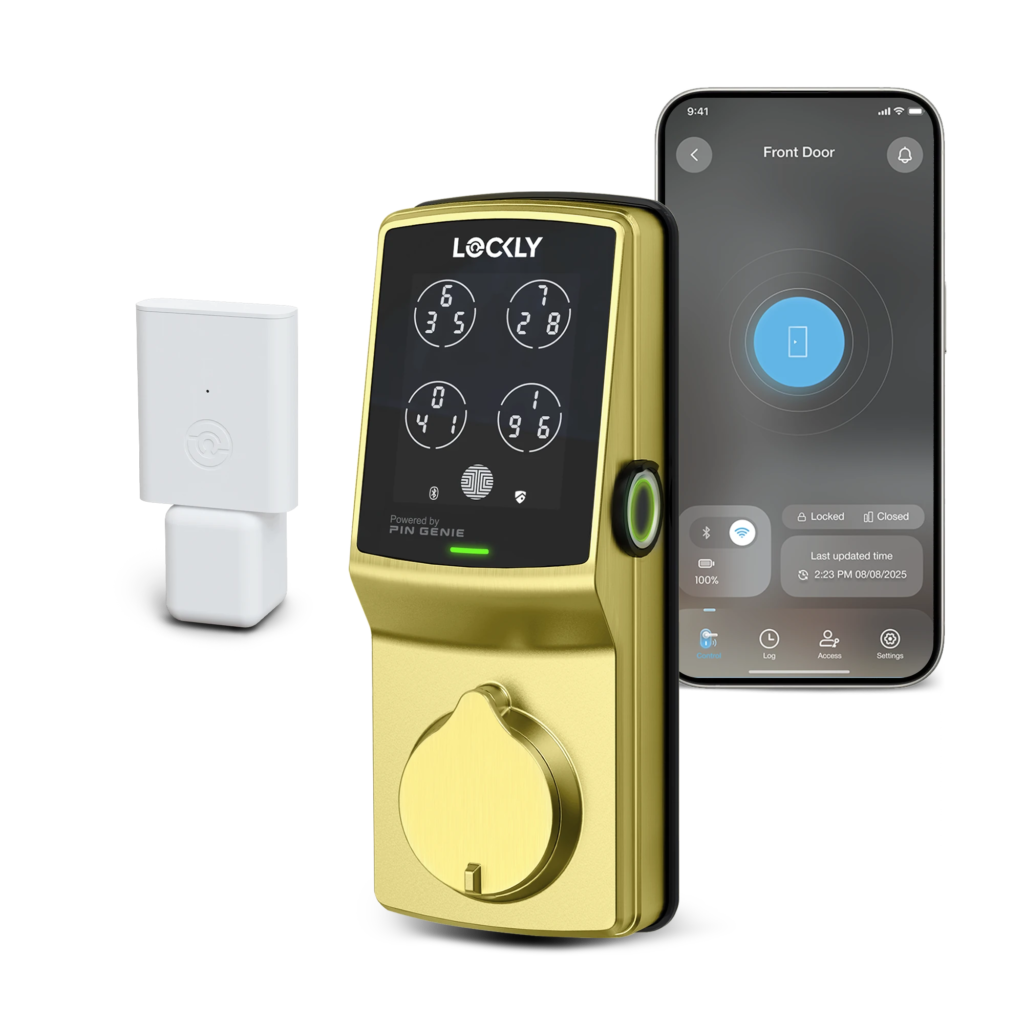
- EntryFingerprint, PIN Genie keypad, app, key
- Fingerprints3D sensor, 0.2-second recognition
- Smart homeBuilt-in 2.4 GHz Wi-Fi (no hub); Alexa, Google
- SecurityShuffling keypad digits; ANSI Grade 2 standards, IP65
- Power4 AA batteries
Lockly’s PIN Genie keypad shuffles the position of the numbers, so smudges and onlookers cannot reveal your code. The latest Secure Pro has a new 3D fingerprint sensor that Lockly says recognizes you in 0.2 seconds.
It now has built-in Wi-Fi, so no hub is needed, and it includes a wired door sensor that shows whether the door is open or closed. It works with Alexa and Google Assistant, is IP65 rated and built to ANSI Grade 2 standards. It costs $309.99 at Lockly.
What we like
- Shuffling keypad hides your code
- Door sensor included
- Wi-Fi hub included
- Up to 10 months per set of batteries
Watch out for
- Pricey
- Installation takes more steps
- No Apple Home support
Best for: People worried about code snooping.
Skip it if: You want a small, simple lock.
Check price on Amazon Price range: $309.99
Aqara Smart Lock U200
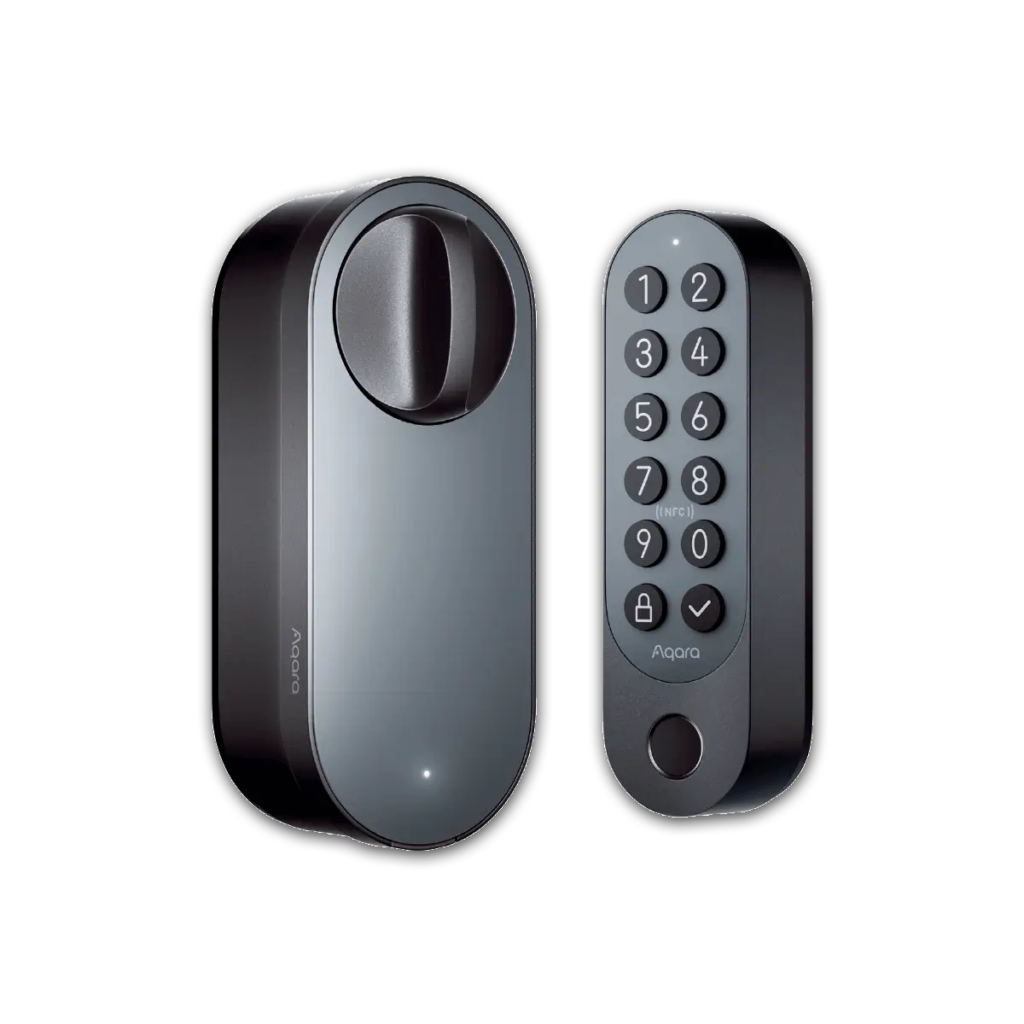
- EntryFingerprint keypad, PIN, Apple home keys, NFC, app, key
- ConnectivityThread, Bluetooth 5.1, NFC
- Smart homeMatter over Thread (needs a Thread border router)
- SecurityRetrofit; keeps your existing exterior key; keypad IPX5
- PowerLock: rechargeable Li-ion or 4 AA; keypad: 4 AAA or wired
Aqara’s U200 supports Apple home keys, so you can tap your iPhone or Apple Watch to unlock. Its outdoor keypad adds fingerprint and PIN entry, plus NFC.
It is a retrofit lock that fits over your existing deadbolt, so you keep your key. It connects over Thread and Bluetooth, and Aqara says you need a Matter controller with a Thread border router for third-party smart homes. The lock runs on an Aqara rechargeable battery or four AA batteries. It costs $169.99 at Aqara.
What we like
- Apple Home Key support
- Matter works across platforms
- Rechargeable lock battery
- Keeps your existing key
Watch out for
- Needs a Thread hub for remote access
- Check door and cylinder compatibility
- Bulky on the inside
Best for: Apple users who want tap-to-unlock.
Skip it if: You have no smart-home hub.
Check price on Amazon Price range: $169.99
eufy Smart Lock C220

- EntryFingerprint, keypad, app, voice, key
- FingerprintsUnlocks in under 1 second, self-learning AI
- Smart homeBuilt-in Wi-Fi; Alexa and Google
- SecurityBHMA Grade 3
- Power8 AA batteries (about 8 months)
eufy’s C220 brings fingerprint, keypad and built-in Wi-Fi to a low price, with no bridge needed. It offers five ways to unlock: fingerprint, app, keypad, voice with Alexa or Google, and a physical key.
eufy says eight AA batteries last about eight months, and it is BHMA Grade 3 certified after more than 100,000 lock cycles. It does not work with Apple Home or Matter. It costs $169.99 at eufy. eufy has had privacy issues with its cameras in the past, so use strong account security.
What we like
- Low price
- Built-in Wi-Fi
- Long battery life
- Easy install
Watch out for
- Grade 3, the entry security level
- No auto-unlock
- Past brand privacy issues
Best for: First-time smart lock buyers on a budget.
Skip it if: You want premium construction.
Check price on Amazon Price range: $169.99
Side-by-side comparison
| Yale Assure Lock 2 Touch | Ultraloq U-Bolt Pro WiFi | Lockly Secure Pro Deadbolt (Latest Version) | Aqara Smart Lock U200 | eufy Smart Lock C220 | |
|---|---|---|---|---|---|
| Best for | Best overall | Best value | Best keypad security | Best for Apple Home | Best budget pick |
| Connection | Wi-Fi, Matter or Z-Wave module | Built-in Wi-Fi | Built-in Wi-Fi | Matter over Thread | Built-in Wi-Fi |
| Apple Home | Not listed | No | No | Yes, with Home Key | No |
| Security grade | Not listed | Not listed | Grade 2 | Retrofit | Grade 3 |
| Batteries | 4 AA | 4 AA | 4 AA | Rechargeable or 4 AA | 8 AA |
| Price | $299.99 | $179.99 | $309.99 | $169.99 | $169.99 |
| Our score | 9 | 8.6 | 8.5 | 8.4 | 8.2 |
How to choose a fingerprint smart lock
1. Check your door
Measure door thickness and backset (the distance from the door edge to the center of the lock hole). Most smart deadbolts fit standard doors, but check the specs.
2. Insist on backups
Fingerprint readers can struggle with wet, cold or worn fingers, and batteries die. Choose a lock with a keypad and a physical key or emergency power option.
3. Look at security grading
ANSI/BHMA grades rate lock strength and durability. Grade 2 or better is a good target for front doors.
4. Match your smart home
Pick a lock that works with your voice assistant or Apple, Google or Alexa home. Matter support works across all of them.
5. Consider battery life
Wi-Fi locks drain batteries faster. Look for low-battery alerts and an easy way to change or charge them.
Smart lock security tips
A smart lock is only as secure as its setup. The FTC recommends strong account security for connected devices. Also:
- Enroll two fingers per person in case one gets cut or wet.
- Use a long keypad code and give guests temporary codes that expire.
- Turn on two-factor authentication for the lock’s app.
- Replace batteries as soon as you get a low-battery alert.
- Reinforce the door frame and strike plate; the strongest lock is only as good as the door.
Frequently asked questions
Are fingerprint door locks secure?
Good ones are. Fingerprint readers are hard to fool, and quality locks are graded for strength. Pair them with a strong door frame and secure app settings.
What happens if the batteries die?
Most locks warn you weeks ahead. If they die, use the backup key, or touch a 9-volt or USB power source to the emergency terminals on some models.
Do fingerprint locks work in the cold or rain?
Most work in normal weather, but very cold, wet or dirty fingers can slow recognition. A keypad backup helps.
Can renters install a fingerprint lock?
Ask your landlord first. Some locks replace the whole deadbolt, while retrofit locks keep the existing exterior lock.
How many fingerprints can a smart lock store?
Many store dozens to 100 fingerprints, enough for the whole family and regular helpers.
Can kids use fingerprint locks?
Yes. Fingerprints are easier for kids than remembering keys or codes, though young children’s fingerprints may need re-enrolling as they grow.
The bottom line
For most homes, the Yale Assure Lock 2 Touch is the best fingerprint smart lock, with a fast reader, multiple backups and flexible smart-home support. Choose the Ultraloq U-Bolt Pro for value, the Lockly Secure Pro for its snoop-proof keypad, the Aqara U200 for Apple Home Key, or the eufy C220 on a budget.
More for a secure home: see the best smart locks for renters, the best DIY home security system, or browse all Smart Locks and Alarms guides.
Sources
- FTC: securing your internet-connected devices at home
- Connectivity Standards Alliance: Matter
- Yale: Assure Lock 2 Touch with Wi-Fi
- Ultraloq: U-Bolt Pro WiFi
- Lockly: Secure Pro Deadbolt (Latest Version)
- Aqara: Smart Lock U200 specs
- eufy: Smart Lock C220
Featured photo: ‘Keypad door lock’ by rafael-castillo, licensed under CC BY 2.0.