
Best Indoor Security Camera (2026): 5 Privacy-Friendly Picks
Last updated: November 9, 2026
Reader-supported: we may earn a commission when you buy through links on this page, at no extra cost to you. It never affects our rankings. Learn more.
An indoor camera lets you check on pets, see when kids get home from school, and get an alert if someone opens the back door while you are away. But a camera inside your home also raises real privacy questions. The best indoor security camera records clear video day and night, sends useful alerts, and gives you strong privacy controls, such as a physical shutter, automatic off when you are home, and secure, encrypted storage.
We compared the most popular indoor cameras on video quality, privacy features, storage options, subscription costs, smart alerts and smart-home support. Here are our picks for 2026.
Our top picks
| Indoor camera | Storage | Score | Buy link |
|---|---|---|---|
| eufy Indoor Cam E220 (Pan and Tilt)Best overall | Local (microSD), no fee | 9 | Check price |
| Ring Indoor Cam (2nd Gen)Best privacy shutter | Cloud with Ring plan | 8.7 | Check price |
| Wyze Cam v4Best budget pick | Local microSD or cloud | 8.5 | Check price |
| Google Nest Cam Indoor (Wired, 3rd Gen)Best for Google homes | Cloud with Google Home Premium | 8.3 | Check price |
| Eve CamBest for Apple Home | iCloud (HomeKit Secure Video) | 8.2 | Check price |
The best indoor security cameras, reviewed
eufy Indoor Cam E220 (Pan and Tilt)
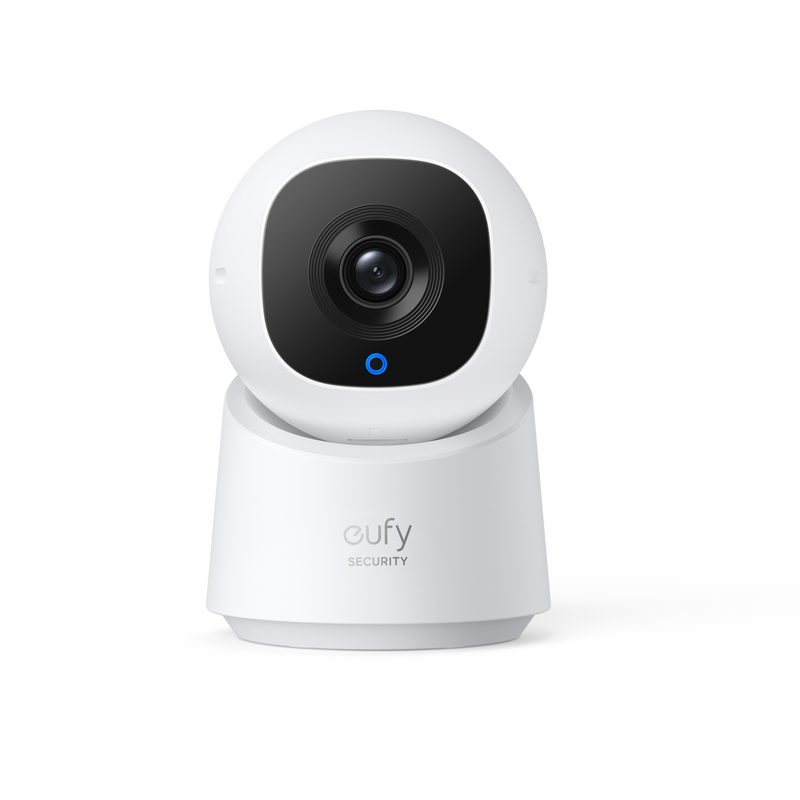
- Video2K with infrared night vision up to 32.8 ft
- Movement360° pan, 96° tilt, auto-tracking
- StorageLocal microSD (not included), optional cloud or NAS; no subscription required
- PrivacyPrivacy mode
- SmartHuman, pet and crying detection; HomeKit, Alexa and Google
eufy’s Indoor Cam E220 records in 2K and pans 360° and tilts 96°, with auto-tracking that follows a person or pet around the room. Its on-device AI detects humans, pets and crying, and it has a privacy mode.
You can save video to a microSD card with no subscription, or use optional cloud or NAS storage, and it works with HomeKit, Alexa and Google Assistant. It was $59.99 at eufy when we checked. eufy has had privacy lapses in the past, so turn on two-factor authentication and keep the app updated.
What we like
- 2K video with 360° pan
- Local storage, no fees
- Human, pet and crying alerts
- Works with HomeKit
Watch out for
- Past brand privacy issues
- Needs a microSD card
- App can be busy
Best for: Most homes that want smart features without monthly fees.
Skip it if: You want end-to-end encrypted cloud storage.
Check price on Amazon Price range: $59.99
Ring Indoor Cam (2nd Gen)

- Video1080p HD with color night vision
- MovementFixed, adjustable mount
- StorageCloud with a Ring plan
- PrivacyManual privacy cover turns off camera and mic; end-to-end encryption option
- SmartWorks with Alexa; 2.4 GHz Wi-Fi
Ring’s second-generation Indoor Cam has a manual privacy cover. Slide it over the lens and the camera and mic turn off, so you know it is not watching or listening.
It records 1080p HD with color night vision, works with Alexa, and Ring offers end-to-end encryption in its privacy settings. You need a Ring plan to save video. It costs $49.99 at Ring.
What we like
- Physical privacy cover
- Optional end-to-end encryption
- Home and away modes
- Easy Alexa integration
Watch out for
- Plan needed for recordings
- 1080p rather than 2K
- 2.4 GHz Wi-Fi only
Best for: Privacy-minded Ring and Alexa homes.
Skip it if: You want to avoid subscriptions.
Check price on Amazon Price range: $49.99
Wyze Cam v4

- Video2.5K QHD with color night vision
- MovementFixed
- Storage24/7 local recording to microSD, optional cloud plan
- ExtrasMotion-activated spotlight, Wi-Fi 6
- SmartAlexa and Google Assistant
Wyze Cam v4 offers sharp 2.5K video, color night vision and a motion-activated spotlight at a low price, and it supports 24/7 local recording to a microSD card.
It supports Wi-Fi 6 and works with Alexa and Google Assistant. It was $44.98 at Wyze when we checked. Wyze has had security incidents in the past, so enable two-factor authentication and keep firmware updated.
What we like
- Low price
- Sharp 2.5K video
- Motion-activated spotlight
- 24/7 local recording
Watch out for
- Past security incidents
- No physical shutter
- microSD card sold separately
Best for: Budget buyers and multiple-room coverage.
Skip it if: Privacy is your top concern.
Check price on Amazon Price range: $44.98
Google Nest Cam Indoor (Wired, 3rd Gen)

- Video2K with HDR and night vision, 152° diagonal view
- MovementFixed
- Storage6 hours of free event previews; longer history with Google Home Premium
- PrivacyGreen light shows when it is streaming; no physical shutter
- SmartPerson, animal and vehicle alerts; Google Home app
Google’s newest wired Nest Cam records in 2K with HDR and a wide 152° diagonal view. Its built-in alerts tell people, animals and vehicles apart.
Without a plan, you get 6 hours of 10-second event previews. Google Home Premium Standard ($10 a month) adds 30 days of event history, and the higher tier adds up to 60 days of events and 10 days of 24/7 video. There is no lens cover, but a green light shows when it is streaming. It costs $129.99 at the Google Store.
What we like
- Sharp 2K HDR video
- Accurate smart alerts
- Great Google Home integration
- Wide 152° view
Watch out for
- Google Home Premium for full history
- No physical shutter
- Works best with Google devices
Best for: Google Home and Nest Hub users.
Skip it if: You use Apple Home or Alexa.
Check price on Amazon Price range: $129.99
Eve Cam

- Video1080p, 150° view, night vision up to 5 m
- MovementFixed
- StorageHomeKit Secure Video in iCloud+
- PrivacyLocal analysis on your home hub; no Eve account
- SmartApple Home only; people, pet and vehicle detection
Eve Cam works only with Apple Home and uses HomeKit Secure Video. An Apple TV, HomePod or iPad home hub analyzes the video locally, and recordings use your iCloud storage. Eve does not make you create an account.
Eve says the live stream is end-to-end encrypted and never reaches the cloud. It records 1080p with a 150° view and night vision, and detects people, pets and vehicles. It needs an Apple home hub and an iCloud+ plan.
What we like
- End-to-end encrypted storage
- No extra camera account
- Apple Home automations
- Local video analysis
Watch out for
- Apple only
- Needs a home hub and iCloud+
- Lower resolution than some rivals
Best for: All-Apple households focused on privacy.
Skip it if: Anyone at home uses Android.
Check price on Amazon Price range: See retailers
Side-by-side comparison
| eufy Indoor Cam E220 (Pan and Tilt) | Ring Indoor Cam (2nd Gen) | Wyze Cam v4 | Google Nest Cam Indoor (Wired, 3rd Gen) | Eve Cam | |
|---|---|---|---|---|---|
| Best for | Best overall | Best privacy shutter | Best budget pick | Best for Google homes | Best for Apple Home |
| Physical privacy | Lens turns away | Slide cover | No | No | No |
| End-to-end encryption | Not listed | Optional | No | No | Yes |
| Subscription for history | No | Yes | Optional | For full history | iCloud+ |
| Pan and tilt | Yes | No | No | No | No |
| Price | $59.99 | $49.99 | $44.98 | $129.99 | See retailers |
| Our score | 9 | 8.7 | 8.5 | 8.3 | 8.2 |
How to choose an indoor security camera
1. Put privacy first
Look for a physical shutter or a privacy mode, automatic off when you are home, and options for local or end-to-end encrypted storage.
2. Understand subscription costs
Some cameras need a monthly plan to save video or get smart alerts. Local storage avoids monthly fees.
3. Check video and night vision
At least 1080p video with good night vision lets you see faces and details in a dark room.
4. Match your smart home
Choose a camera that works with Alexa, Google Home or Apple Home so you can view it on displays and automate it.
5. Secure your account
Use a strong, unique password and two-factor authentication. Keep firmware updated.
Indoor camera privacy tips
A camera inside your home deserves extra care. The FTC and CISA recommend strong account security, and a few common-sense habits help:
- Do not put cameras in bedrooms or bathrooms.
- Tell guests, babysitters and housekeepers about cameras, and check local laws on recording audio.
- Turn cameras off or cover them when the family is home, or use automatic home and away modes.
- Review who has access to the camera app and remove old users.
- Change default passwords and turn on two-factor authentication.
Frequently asked questions
Are indoor security cameras safe?
They can be, with strong passwords, two-factor authentication and up-to-date firmware. Choose brands with good privacy features and track records.
Do indoor cameras need a subscription?
Not always. Cameras with local storage, like eufy and Wyze, work without one. Ring and Nest need plans for full video history (Nest uses Google Home Premium).
Where should I put an indoor camera?
In main living areas, entry halls and near back doors, facing entrances. Avoid private rooms.
Can someone hack my indoor camera?
Weak passwords and outdated firmware make hacking easier. Two-factor authentication and updates greatly reduce the risk.
Is it legal to record audio in my home?
Laws vary by state and country, and some require consent from everyone being recorded. Check local laws, and turn off audio if you are unsure.
Can an indoor camera watch my pets?
Yes. Many have pet detection, two-way audio and even treat-tossing models for pets.
The bottom line
For most homes, the eufy Indoor Cam E220 is the best indoor security camera, with sharp video, local storage and a privacy mode. Choose the Ring Indoor Cam for a physical privacy cover, the Wyze Cam v4 on a budget, the Google Nest Cam for Google homes, or the Eve Cam for Apple Home privacy.
More for home security: see the best security cameras with no monthly fees, the best pet camera with a treat dispenser, or browse all Security Cameras and Doorbells guides.
Sources
- FTC: securing your internet-connected devices at home
- CISA: secure our world
- eufy: Indoor Cam E220
- Ring: Indoor Cam (2nd Gen)
- Wyze: Cam v4
- Google Store: Nest Cam Indoor (wired, 3rd gen)
- Eve: Eve Cam
Featured photo: ‘Indoor CCTV camera’ by rawpixel, CC0 public domain.


