Best DIY Home Security System (2026): 5 No-Contract Picks
Last updated: November 9, 2026
Reader-supported: we may earn a commission when you buy through links on this page, at no extra cost to you. It never affects our rankings. Learn more.
Home security used to mean a technician, drilled wires and a multi-year contract. Today, DIY systems arrive in a box, stick to your walls in an afternoon and let you choose whether to pay for professional monitoring month to month. The best DIY home security system has reliable sensors, a loud siren, backup power and cellular connection, and fair monitoring prices with no long contract.
We compared the most popular DIY systems on equipment quality, monitoring options and cost, contracts, backup connections, smart-home integration, app quality and ease of setup. Here are our picks for 2026.
Our top picks
| Security system | Pro monitoring | Score | Buy link |
|---|---|---|---|
| SimpliSafeBest overall | Optional, month to month | 9 | Check price |
| Ring Alarm ProBest for Ring and Alexa homes | Optional, with a Ring Home plan | 8.7 | Check price |
| abode iotaBest for smart-home fans | Optional; free self-monitoring | 8.4 | Check price |
| CoveBest for pro monitoring | Required, from about $0.67/day | 8.3 | Check price |
| Wyze Home MonitoringBest budget pick | Optional, paid plan | 8 | Check price |
The best DIY home security systems, reviewed
SimpliSafe

- EquipmentBase station, keypad, entry and motion sensors, plus many add-ons
- MonitoringOptional professional monitoring, no contracts
- Backup24-hour backup battery
- Siren100 dB on the base station
- ExtrasVideo verification on higher plans; cameras and smoke and water sensors
SimpliSafe is the DIY system we would recommend to most people. Setup is simple, and the base station has a 100 dB siren and a 24-hour backup battery that keeps it working if the power goes out.
Its monitoring plans have no contracts or cancellation fees, and you can try any plan free for a month. Higher tiers add video verification, which lets agents confirm a break-in for faster police response. You can also self-monitor, though some features need a plan.
What we like
- Very easy setup
- Reliable sensors and loud siren
- Flexible monthly monitoring
- Wide range of add-on sensors
Watch out for
- Best features need a paid plan
- No Apple HomeKit support
- Cameras cost extra
Best for: Most homeowners and renters who want simple, reliable security.
Skip it if: You want deep smart-home automation.
Check price on Amazon Price range: See SimpliSafe
Ring Alarm Pro

- EquipmentBase station with built-in eero Wi-Fi 6 router, keypad, sensors
- MonitoringProfessional monitoring add-on with a Ring Home plan
- Backup24-hour battery backup; backup internet with a plan
- Smart homeAlexa; works with Ring cameras and doorbells
- Wi-Fieero Wi-Fi 6, up to 1,500 sq. ft.
Ring Alarm Pro’s base station doubles as an eero Wi-Fi 6 router covering up to 1,500 sq. ft., and with a compatible Ring subscription it can keep your system online through internet outages with backup cellular data. It has 24-hour battery backup.
It works with Ring doorbells, cameras and Alexa, and professional monitoring is an add-on to a Ring Home plan. The 8-piece kit costs $299.99 at Ring. It works best if you already use Ring and Amazon devices; otherwise, SimpliSafe is simpler.
What we like
- Built-in eero Wi-Fi router
- Affordable monitoring
- Works with Ring cameras and Alexa
- Backup internet with plan
Watch out for
- Best for Amazon and Ring users
- Many features tied to a plan
- Privacy concerns for some users
Best for: Homes with Ring doorbells and Alexa.
Skip it if: You prefer to avoid the Amazon ecosystem.
Check price on Amazon Price range: $299.99 (8-piece)
abode iota
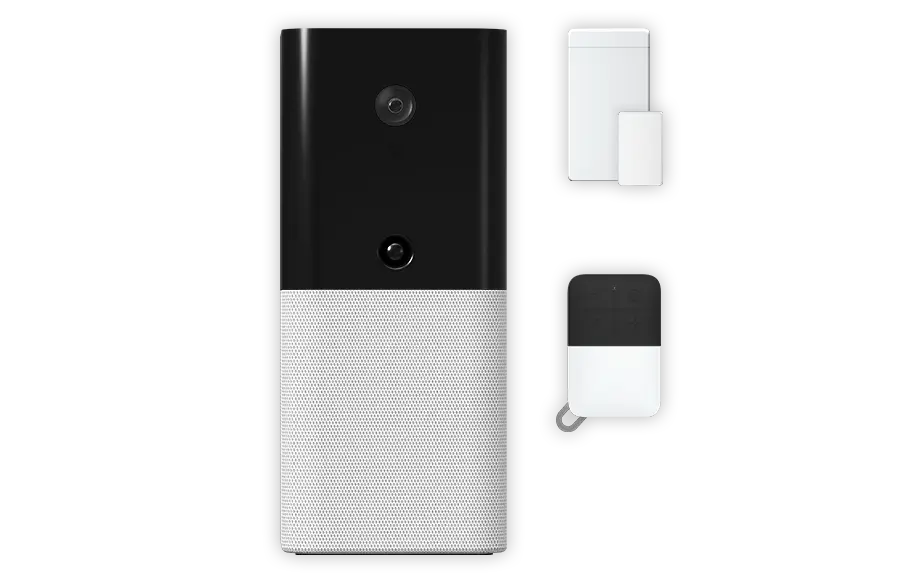
- Equipmentiota hub with 1080p camera, motion sensor and 93 dB siren, plus a door sensor and key fob
- MonitoringFree self-monitoring; paid plans from $7/month
- BackupBattery backup; cellular backup with a plan
- Smart homeApple HomeKit, Alexa, Google, Z-Wave and Zigbee
- ConnectionEthernet or 2.4 GHz Wi-Fi
abode’s iota hub combines a 1080p camera with a 127° view, a motion sensor and a 93 dB siren in one device. The kit adds a door/window sensor and a key fob, and it works with Apple HomeKit, Alexa, Google Home, Zigbee and Z-Wave.
App control, live video and self-monitoring are free, and paid plans from $7 a month add professional monitoring and cellular backup. A built-in battery keeps it running during power outages. The kit was $199 at abode when we checked.
What we like
- Works with HomeKit, Alexa and Google
- Powerful automations
- Free self-monitoring
- All-in-one hub
Watch out for
- App has a learning curve
- Recorded camera clips need a plan
- Smaller company
Best for: Smart-home enthusiasts and Apple users.
Skip it if: You want the simplest setup.
Check price on Amazon Price range: $199 (sale; list $399)
Cove

- EquipmentHub, panel and sensors you choose online
- MonitoringProfessional monitoring plans
- PricingAbout $0.67 to $1.33 a day
- StorageCloud video storage on higher plans
- Extras60-day risk-free trial
Cove is built around professional monitoring, and you build your kit online. Its plans are priced per day, from about $0.67 to $1.33 a day, and the higher tiers add cloud video storage and a monthly equipment credit.
Cove offers a 60-day risk-free trial. Every Cove system is meant to be professionally monitored, so it is not a fit if you only want to self-monitor.
What we like
- 24/7 monitoring with no contract
- 4G cellular backup
- Talking touchscreen panel
- Easy install
Watch out for
- Monitoring plan required
- Fewer smart-home features
- Touchscreen panel is bulky
Best for: People who want professional monitoring without a contract.
Skip it if: You want to self-monitor only.
Check price on Amazon Price range: From about $0.67/day
Wyze Home Monitoring

- EquipmentSense Hub, keypad, entry and motion sensors
- MonitoringSelf-monitored by default; optional Wyze Home Monitoring Service
- HubWyze Sense Hub required ($55.98)
- Smart homeWorks with Wyze cameras
- ExtrasInexpensive add-on sensors
Wyze Home Monitoring covers the basics: the Sense Hub, a keypad and entry and motion sensors. By default the system is self-monitored, so it alerts you and you decide what to do.
Wyze Home Monitoring Service adds 24/7 professional monitoring for a small fee. The sensors need the Wyze Sense Hub, which costs $55.98 at Wyze. It works with Wyze’s affordable cameras, but the equipment is more basic than SimpliSafe.
What we like
- Very low monitoring price
- Free self-monitoring
- Cheap equipment and add-ons
- No long contract
Watch out for
- More basic hardware
- Busy app
- Fewer sensor types
Best for: Budget-minded renters and first-time buyers.
Skip it if: You want premium hardware.
Check price on Amazon Price range: Hub $55.98
Side-by-side comparison
| SimpliSafe | Ring Alarm Pro | abode iota | Cove | Wyze Home Monitoring | |
|---|---|---|---|---|---|
| Best for | Best overall | Best for Ring and Alexa homes | Best for smart-home fans | Best for pro monitoring | Best budget pick |
| Pro monitoring | Optional | Optional | Optional | Required | Optional |
| Self-monitoring | Yes, with limits | Yes | Free | No | Free |
| Cellular backup | With plan | With plan | With plan | Not listed | Not listed |
| Apple HomeKit | No | No | Yes | No | No |
| Price | See SimpliSafe | $299.99 (8-piece) | $199 (sale; list $399) | From about $0.67/day | Hub $55.98 |
| Our score | 9 | 8.7 | 8.4 | 8.3 | 8 |
How to choose a DIY home security system
1. Decide on monitoring
Professional monitoring means an agent calls you and dispatches help when an alarm sounds. Self-monitoring sends alerts to your phone, and you decide what to do. Professional monitoring is better if you travel or might miss alerts.
2. Look for backup power and cellular
Burglars can cut power or internet. A system with battery backup and a cellular connection keeps working.
3. Cover the right spots
Put entry sensors on exterior doors and easy-to-reach windows, and motion sensors in main hallways. Add smoke, carbon monoxide and water leak sensors if offered.
4. Check smart-home compatibility
If you use Alexa, Google or Apple Home, pick a system that works with it so you can arm, disarm and automate easily.
5. Read the fine print
Look for month-to-month plans, check which features need a subscription, and ask if your home insurer offers a discount for monitored systems.
Keep your system secure
A smart security system is only as secure as the accounts that control it. The FTC recommends a few simple steps:
- Use a strong, unique password for your security app and turn on two-factor authentication.
- Keep the app, hub and cameras updated.
- Use a secure, password-protected Wi-Fi network with a modern encryption setting.
- Review who has access to your system and remove old users.
Frequently asked questions
Are DIY home security systems worth it?
For many homes, yes. They cost less than traditional systems, need no technician or long contract, and still offer professional monitoring if you want it.
Do I need professional monitoring?
Not always. Self-monitoring is free or cheap but depends on you seeing alerts. Professional monitoring is better if you are often away or asleep when alarms happen.
Can renters use DIY security systems?
Yes. Most sensors stick on with adhesive and come off cleanly, and you can take the system with you when you move.
Do DIY systems work without Wi-Fi?
Many have cellular backup when you subscribe to a monitoring plan, so they can still send alarms if the internet goes down.
Will a security system lower my insurance?
Many insurers offer a discount for professionally monitored systems. Ask your insurer for details.
Can a DIY system detect fire and floods?
Many systems offer smoke, carbon monoxide and water leak sensors as add-ons, which can alert you or a monitoring center.
The bottom line
For most homes, SimpliSafe is the best DIY home security system, with easy setup, reliable sensors and flexible monitoring. Choose Ring Alarm Pro for Ring and Alexa homes, abode iota for smart-home fans, Cove for contract-free pro monitoring, or Wyze Home Monitoring on a budget.
More for a safer home: see the best smart locks for renters, the best solar security camera, or browse all Smart Locks and Alarms guides.
Sources
- FTC: securing your internet-connected devices at home
- CISA: secure our world
- SimpliSafe: Compare plans
- SimpliSafe: Base Station
- Ring: Alarm Pro Security Kit, 8-Piece
- abode: iota All-In-One Security Kit
- abode: Plans
- Cove: Monitored security plans
- Wyze: Home Monitoring
Featured photo: ‘Alarm system keypad’ by www.homejobsbymom.com, licensed under CC BY 2.0.