Best Smart Locks for Renters (2026): No Drilling, Keep Your Keys
Last updated: November 9, 2026
Reader-supported: we may earn a commission when you buy through links on this page, at no extra cost to you. It never affects our rankings. Learn more.
Renting does not mean you are stuck with a plain key. The best smart locks for renters fit over the inside of the deadbolt you already have, so there is no drilling, the outside of the door looks exactly the same, and your landlord’s key keeps working. You get keyless entry, auto-lock, temporary codes for guests and alerts on your phone, and you can take the lock with you when you move.
We compared the most popular retrofit smart locks on how easy they are to install and remove, whether they need a hub, battery life and which smart home systems they work with. Here are our picks for 2026.

Our top picks
| Smart lock | Install | Score | Buy link |
|---|---|---|---|
| August Wi-Fi Smart Lock (4th Gen)Best overall for renters | Inside thumb-turn only | 9.0 | Check price |
| Yale Approach Lock with Wi-Fi + KeypadBest value | Inside thumb-turn only | 8.8 | Check price |
| Aqara Smart Lock U200Best for Apple Home | Over the inside thumb-turn | 8.6 | Check price |
| SwitchBot Lock UltraBest rechargeable pick | Over the thumb-turn, no drilling | 8.5 | Check price |
| Level BoltMost invisible | Replaces the bolt inside the door | 8.3 | Check price |
The best smart locks for renters, reviewed
August Wi-Fi Smart Lock (4th Gen)

- Installs onInside of your existing deadbolt
- Keeps your keyYes, outside of the door does not change
- ConnectivityBuilt-in Wi-Fi (2.4 or 5 GHz), no hub needed
- Works withAlexa, Google Assistant, Apple Home
- Batteries2 x CR123, up to about 3 months
The August Wi-Fi Smart Lock is the easiest way to make a rental apartment smart without touching the outside of the door. It replaces only the inside thumb-turn of your existing deadbolt, so your landlord’s key keeps working.
Wi-Fi is built in, so you can lock and unlock from anywhere without a hub. DoorSense tells you whether the door is actually closed. When you move out, you screw the original thumb-turn back on in about 10 minutes.
What we like
- Nothing changes on the outside of the door
- Built-in Wi-Fi, no hub to buy
- Works with Alexa, Google and Apple Home
- DoorSense shows if the door is really shut
Watch out for
- CR123 batteries last only about 3 months
- Batteries cost more than AAs
- No keypad or fingerprint unless you add a keypad
Best for: Most renters who want remote access and a lock their landlord will never notice.
Skip it if: You want a built-in fingerprint reader or rechargeable battery.
Check price on Amazon Price range: $199.99
Yale Approach Lock with Wi-Fi + Keypad
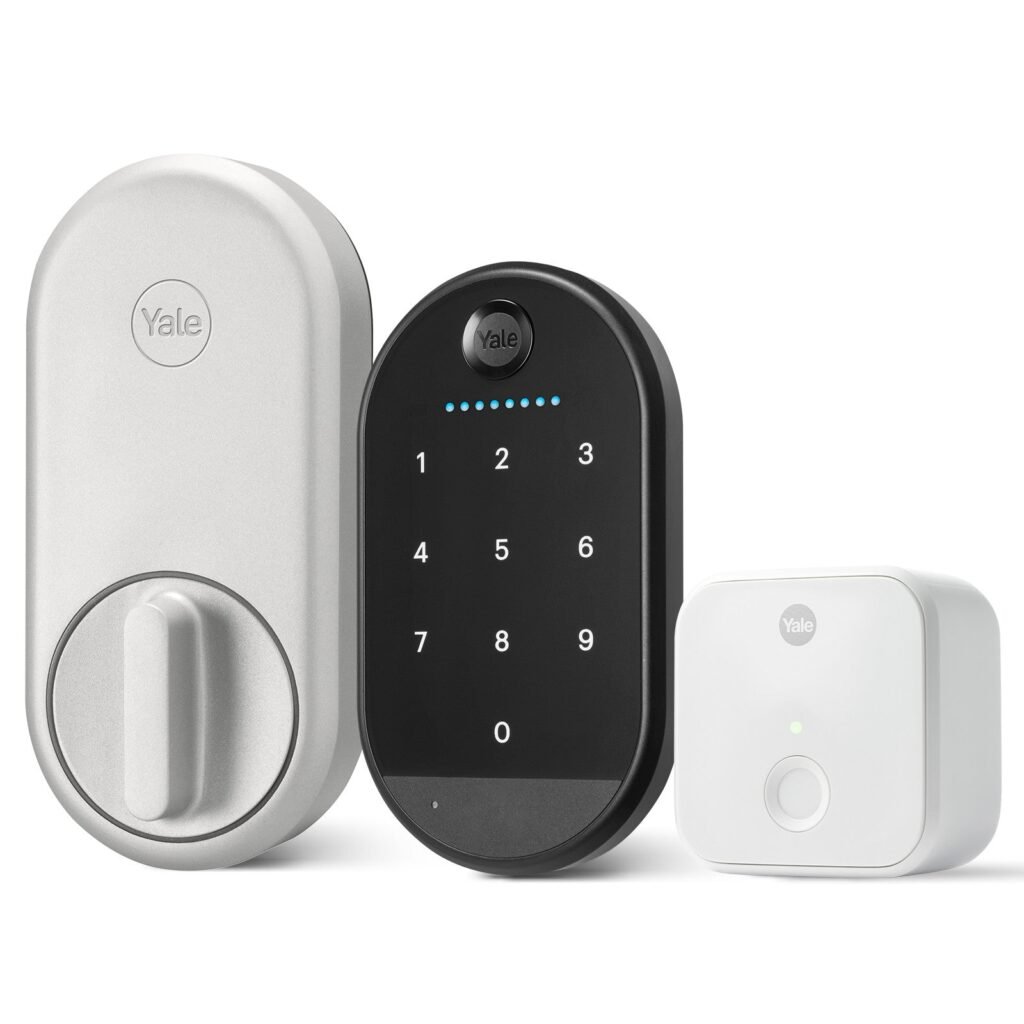
- Installs onInside of your existing deadbolt
- Keeps your keyYes
- ConnectivityWi-Fi through the included plug-in Yale Connect bridge
- Works withAlexa, Google Home, SmartThings, Philips Hue
- BatteriesLock: 4 AA (about 12 months); keypad: 4 AAA (about 7 months)
Yale’s first retrofit lock fits over the inside of your current deadbolt in about 10 minutes and keeps your existing key. The bundle includes a small Wi-Fi bridge that plugs into an outlet near the door.
The included keypad lets roommates, dog walkers or cleaners get in with their own code. Yale rates the lock’s AA batteries at about a year, and it supports auto-lock, auto-unlock and a door-position sensor.
What we like
- Keypad included
- About a year per set of AA batteries
- Auto-lock and auto-unlock
- Share digital keys and scheduled codes
Watch out for
- Wi-Fi bridge needs a nearby power outlet
- No Apple Home support yet
- Keypad batteries last about 7 months
Best for: Renters who want keypad codes for guests or roommates.
Skip it if: You use Apple Home or have no outlet near the door.
Check price on Amazon Price range: From $179.99
Aqara Smart Lock U200
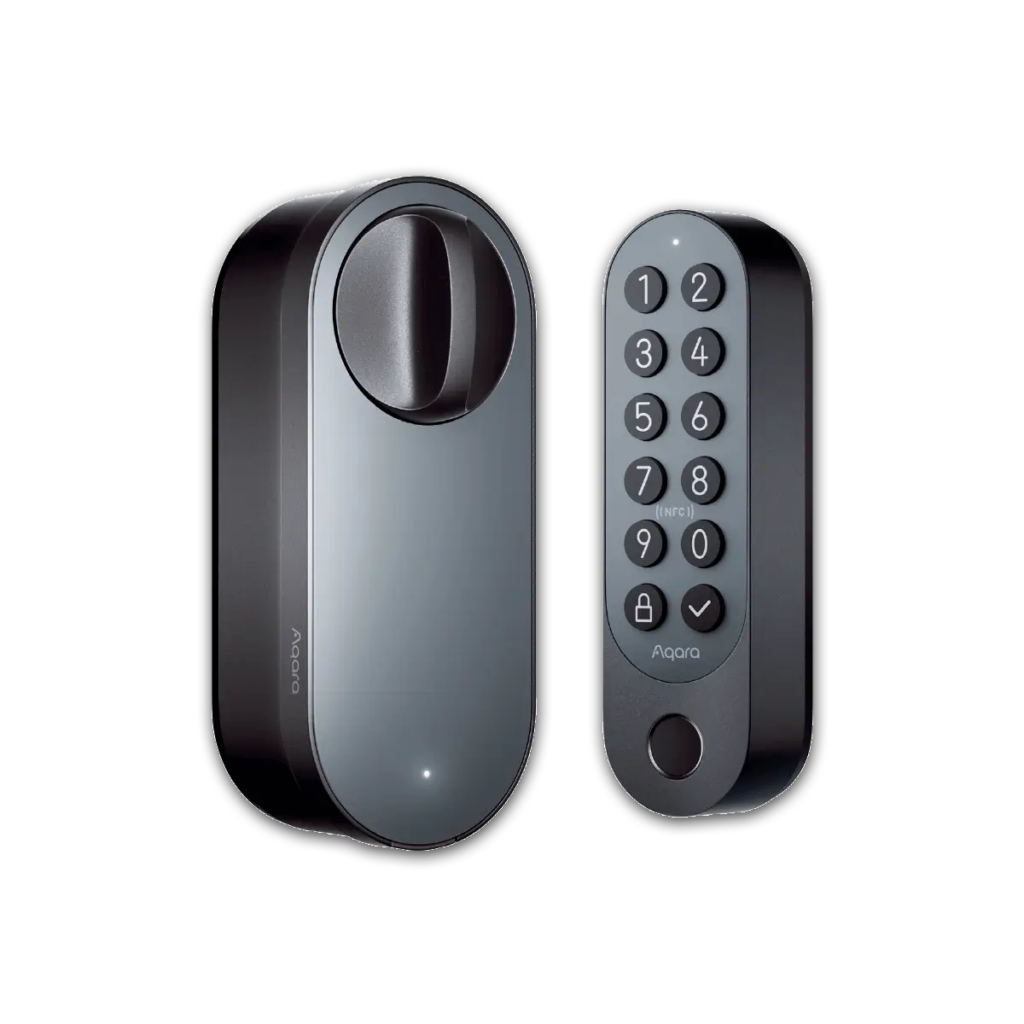
- Installs onInside of your existing deadbolt
- Keeps your keyYes
- ConnectivityMatter over Thread, Bluetooth
- Unlock methodsFingerprint, PIN, NFC, Apple Home Key, app
- BatteryRechargeable lock (up to 6 months); keypad uses 4 x AAA
If you live in the Apple world, the Aqara U200 is the retrofit lock to get. It supports Apple Home Key, so you can tap your iPhone or Apple Watch to unlock, and it works through Matter with Alexa, Google Home and SmartThings too.
It comes with an outdoor keypad with a fingerprint reader, PIN codes and NFC. The lock runs on a rechargeable battery rated at up to six months. For remote access you need a Thread border router hub.
What we like
- Apple Home Key tap-to-unlock
- Fingerprint keypad included
- Matter and Thread support for every major platform
- Rechargeable lock battery
Watch out for
- Most expensive pick on our list
- Bulky on the inside
- Needs a Thread hub for remote access
Best for: iPhone users who want fingerprint and tap-to-unlock without replacing their deadbolt.
Skip it if: You want the smallest lock or do not use a Thread hub.
Check price on Amazon Price range: $169.99
SwitchBot Lock Ultra

- Installs onMounting frame over your deadbolt thumb-turn
- Keeps your keyYes
- ConnectivityBluetooth; Wi-Fi and Matter with a SwitchBot Hub
- BatteryRechargeable, up to 12 months (US version), plus CR123A backup
- Add-onsKeypad Touch (fingerprint) or Keypad Vision (face)
SwitchBot designed its locks for renters. The Lock Ultra clips onto a mounting frame over your existing thumb-turn, so there is nothing to drill and nothing to change outside.
Its rechargeable pack is rated for up to 12 months on US deadbolts, and a CR123A backup takes over while it charges. For remote access and Matter you add a SwitchBot Hub, plus a fingerprint or face keypad if you want one.
What we like
- Long rechargeable battery with backup
- Easy, reversible install
- Wide choice of keypad add-ons
- Works with Apple Home via Matter hub
Watch out for
- Needs a hub for remote access and voice control
- Accessories add to the total price
- Bulkier than August
Best for: Renters who want a rechargeable lock they can take to their next apartment.
Skip it if: You want an all-in-one box with Wi-Fi built in.
Check price on Amazon Price range: $139.99
Level Bolt
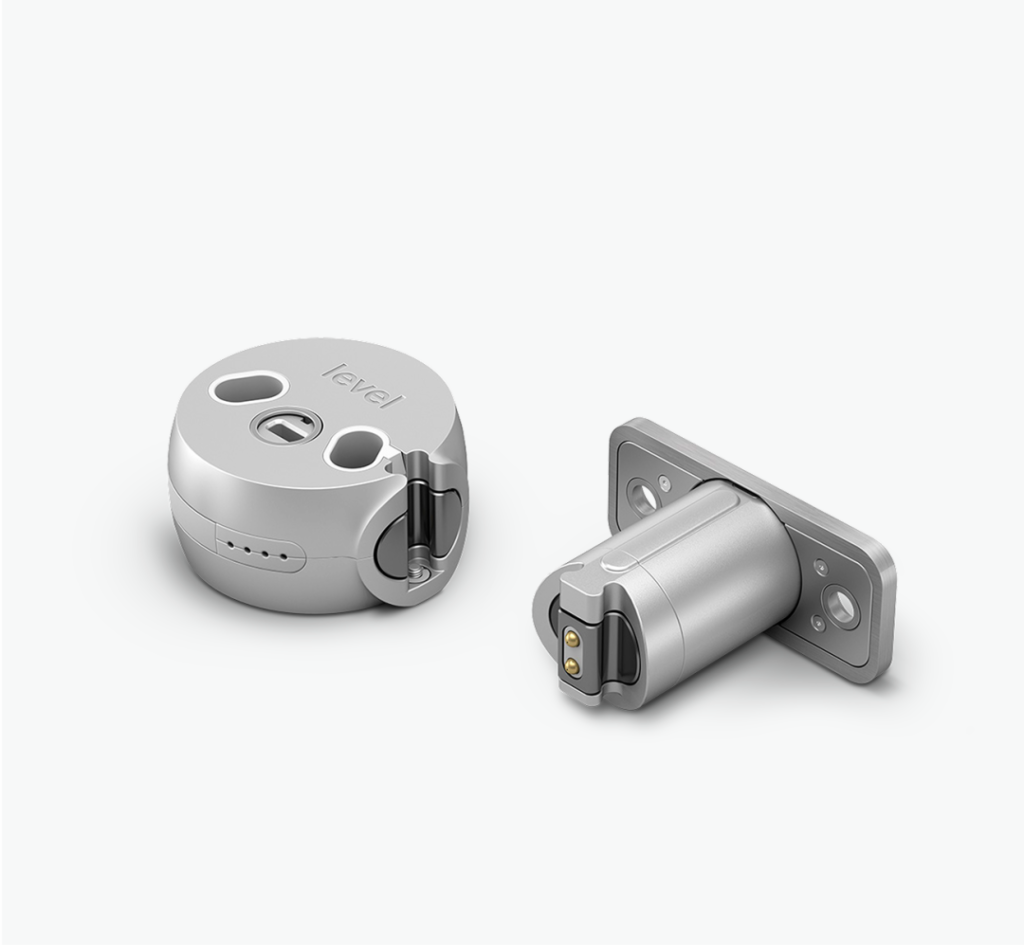
- Installs onReplaces the bolt inside your door
- Keeps your keyYes, same keys and door hardware
- ConnectivityBluetooth, Matter over Thread
- Works withApple Home, Google Home, Alexa, SmartThings
- Batteries1 CR2 lithium
Level Bolt is the only pick you cannot see at all. Instead of adding a box to the inside of the door, it replaces the bolt mechanism hidden inside the door edge, and you keep your existing keys, thumb-turn and handles.
The trade-off for renters is that installation means removing your deadbolt, so ask your landlord first and keep the original bolt to reinstall when you move. Remote features need a Matter-over-Thread hub.
What we like
- Completely invisible inside and out
- Keeps your existing keys and hardware
- Matter over Thread support
- Runs on a single CR2 battery
Watch out for
- Installation takes the deadbolt apart, so get landlord approval
- Remote features need a Thread hub
- Keypad sold separately
Best for: Design-conscious renters whose landlord allows a deadbolt swap.
Skip it if: Your lease forbids any changes to the lock.
Check price on Amazon Price range: $199
Side-by-side comparison
| August Wi-Fi Smart Lock (4th Gen) | Yale Approach Lock with Wi-Fi + Keypad | Aqara Smart Lock U200 | SwitchBot Lock Ultra | Level Bolt | |
|---|---|---|---|---|---|
| Best for | Best overall for renters | Best value | Best for Apple Home | Best rechargeable pick | Most invisible |
| Installs on | Inside thumb-turn | Inside thumb-turn | Inside thumb-turn | Frame over thumb-turn | Replaces the bolt |
| Connectivity | Built-in Wi-Fi | Wi-Fi bridge | Thread, Bluetooth | Bluetooth (+ hub) | Bluetooth, Thread |
| Apple Home | Yes | No | Yes, with Home Key | Via Matter hub | Yes |
| Power | 2 x CR123 | 4 x AA | Rechargeable | Rechargeable | 1 x CR2 |
| Price | $199.99 | From $179.99 | $169.99 | $139.99 | $199 |
| Our score | 9.0 | 8.8 | 8.6 | 8.5 | 8.3 |
Can renters install a smart lock?
In most cases, yes, as long as you choose a retrofit smart lock. Most leases say you cannot change or re-key the locks, because the landlord needs a working key for emergencies and repairs. A retrofit lock replaces only the interior thumb-turn, so the deadbolt, the key cylinder and the landlord’s key all stay the same.
- Read your lease for any rule about “altering locks” or “installing devices.”
- Tell your landlord and explain that their key will still work. Get a yes in writing, even by text or email.
- Keep every original part so you can return the door to how it was.
- Skip full replacement locks with a new keyed cylinder unless your landlord approves and receives a key.
How to choose a smart lock for an apartment door
1. Check that your deadbolt is compatible
Retrofit locks fit most standard single-cylinder deadbolts in the US. Before you buy, make sure your deadbolt has a thumb-turn on the inside and a key on the outside, and that the bolt slides smoothly without pushing or pulling the door. Most brands have a compatibility checker on their website. Some apartment buildings use mortise locks, which only certain models, such as the Aqara U200, support.
2. Decide how you want to unlock
Phone-only locks are the cheapest. If you have roommates, a dog walker or house guests, choose a model with a keypad, so everyone can have their own code that you can turn off at any time. A fingerprint keypad is the fastest option for people who hate typing codes.
3. Built-in Wi-Fi or a hub?
A lock with built-in Wi-Fi, like the August, lets you unlock remotely right out of the box. Others need a small bridge or hub that plugs into an outlet. That is fine in most apartments, but check that there is a power outlet within about 30 feet of the door.
4. Match your smart home system
If you use Alexa, Google Home or Apple Home, choose a lock that supports it directly or through Matter, the new universal smart home standard. Apple users who want tap-to-unlock with an iPhone should look for Apple Home Key support.
5. Think about batteries
CR123 batteries last a few months, AA batteries are cheap and easy to find, and rechargeable locks save money over time but need a USB-C charge a few times a year. Every lock on our list warns you well before the battery runs out.
How to install a smart lock without changing your deadbolt
- Lock the door and remove the two screws holding the inside thumb-turn plate.
- Take off the thumb-turn and store it with the screws in a labeled bag.
- Attach the smart lock’s mounting plate using the same deadbolt screws, or the included longer ones.
- Clip or slide the smart lock body onto the plate so it grips the deadbolt’s tailpiece.
- Install batteries, open the app and follow the calibration steps.
- Add the door sensor if included, then test locking and unlocking with the door open and closed.
Most retrofit locks take 10 to 20 minutes and only need a screwdriver. Nothing on the outside of the door is touched.
What to do when you move out
Remove the smart lock, reattach the original thumb-turn with the original screws and delete the lock from your app so the next tenant cannot be locked out or tracked. Then reset the lock to factory settings before you install it at your new place.
Frequently asked questions
Can renters install a smart lock without the landlord knowing?
A retrofit lock like the August, Yale Approach or SwitchBot changes only the inside of the door and keeps the original key working, so it usually does not break a typical lease. Still, read your lease and tell your landlord. Many landlords are happy to approve a lock that leaves their key and hardware untouched.
Do I need my landlord’s permission to install a smart lock?
It depends on your lease. Most leases forbid changing or re-keying locks, but a retrofit lock does neither, because the landlord’s key still works. Locks that replace the deadbolt, like the Level Bolt, are more likely to need written permission. When in doubt, ask first and get the answer in writing.
Will a smart lock still work if my Wi-Fi goes down?
Yes. All of these locks keep working locally over Bluetooth from your phone, and you can always use your key or the inside thumb-turn. You only lose remote features, such as unlocking from work, until the internet comes back.
What happens if the smart lock battery dies?
You will get low-battery warnings in the app for days or weeks before it runs out. If it does die, your regular key still opens the door from outside, because every lock on this list keeps the original key cylinder.
Can I take my smart lock with me when I move out?
Yes. Remove the smart lock, screw the original thumb-turn back onto the deadbolt, and the door is exactly as you found it. Keep the original parts in a labeled bag so you do not lose them.
Are retrofit smart locks secure?
A retrofit lock is as strong as the deadbolt it sits on, because the bolt itself does not change. The smart part adds features such as activity logs, auto-lock and temporary codes, which can make a rental safer than handing out copies of physical keys.
The bottom line
For most renters, the August Wi-Fi Smart Lock is the best choice: it keeps your landlord’s key, changes nothing outside the door and has Wi-Fi built in. Choose the Yale Approach if you want a keypad at a lower price, the Aqara U200 for Apple Home Key and fingerprint entry, the SwitchBot Lock Ultra for a rechargeable battery, or the Level Bolt if your landlord approves a completely invisible upgrade.
Want to protect your apartment even more? See our guide to the best security cameras with no monthly fees, browse all Smart Locks & Alarms guides, or ask us a question.