Best Security Key for Online Accounts (2026): 4 Picks to Block Phishing
Last updated: November 9, 2026
Reader-supported: we may earn a commission when you buy through links on this page, at no extra cost to you. It never affects our rankings. Learn more.
Passwords get stolen, and codes sent by text message or typed into a fake website can be hijacked. A hardware security key is a small USB or NFC device that you plug in or tap to log in. It only works with the real website, so even if you land on a convincing fake page, there is nothing for a scammer to steal.
We compared four of the most popular security keys on supported protocols, connectors, durability and price. Here is what we recommend in 2026.
Our top picks
| Security key | Connector and protocols | Score | Buy link |
|---|---|---|---|
| YubiKey 5C NFCBest overall | USB-C + NFC | Multi-protocol | 9.2 | Check price |
| Yubico Security Key C NFCBest value | USB-C + NFC | FIDO2 and U2F only | 9.0 | Check price |
| YubiKey 5 NFC (USB-A)Best for USB-A computers | USB-A + NFC | Multi-protocol | 8.8 | Check price |
| Google Titan Security KeyBest for Google accounts | USB-A or USB-C + NFC | FIDO2 | 8.5 | Check price |
The best security keys, reviewed
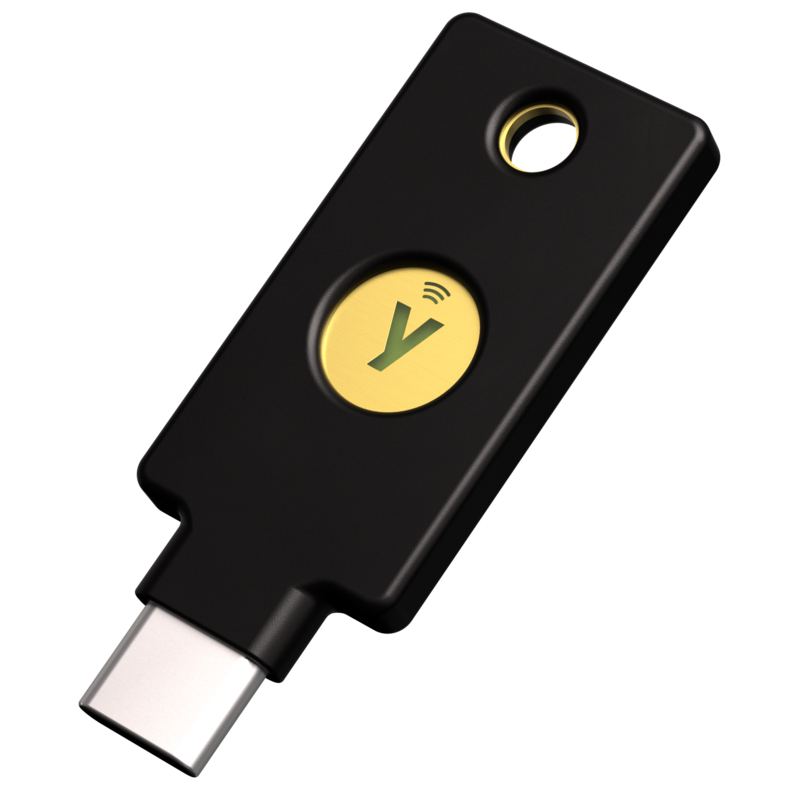
YubiKey 5C NFC
- ConnectorUSB-C plus NFC
- ProtocolsFIDO2/WebAuthn, FIDO U2F, Yubico OTP, OATH-TOTP/HOTP, smart card (PIV), OpenPGP
- Passkey slots100 (firmware 5.8)
- DurabilityIP68 rated, crush resistant, no battery, no moving parts
- Price on Yubico's site$58
The YubiKey 5C NFC is the key we would buy for ourselves. Yubico calls the 5 Series its most versatile key, and the list of protocols backs that up: FIDO2 and U2F for passkeys and two-step login, plus one-time codes, smart card (PIV) and OpenPGP for work logins and encryption. The USB-C plug fits modern laptops, tablets and many phones, and NFC lets you tap it on a phone. It has no battery and no moving parts, and Yubico rates it IP68 for water and dust resistance and says it is crush resistant. It can store up to 100 passkeys.
What we like
- Works with nearly every service and protocol
- USB-C and NFC cover laptops and phones
- Stores up to 100 passkeys
- Durable, battery-free build
Watch out for
- Costs twice as much as the Security Key series
- Extra protocols are overkill for basic personal use
- USB-C only, so older USB-A computers need an adapter
Best for: Anyone who wants one key that works everywhere, including for work accounts, SSH and encryption.
Skip it if: You only need basic two-step login for personal accounts and want to spend less.
Check price on Amazon Price range: $58
Yubico Security Key C NFC
- ConnectorUSB-C plus NFC
- ProtocolsFIDO2/WebAuthn and FIDO U2F only
- Firmware5.8
- MadeManufactured in Sweden, programmed in the USA
- Price on Yubico's site$29
For most people, the Security Key C NFC does everything they need at half the price of a YubiKey 5. It supports FIDO2/WebAuthn, which includes hardware-bound passkeys, and FIDO U2F, and that covers sign-in for Google, Microsoft, Apple, GitHub and a long list of other major services. Yubico says it is the more affordable key and that it uses an improved injection molding process to be very durable. It plugs into USB-C and taps on a phone over NFC, and you can manage its PIN and passkeys with Yubico’s Authenticator app. The trade-off is that it does not do one-time codes, smart card or OpenPGP.
What we like
- Half the price of a YubiKey 5
- Covers FIDO2 passkeys and U2F two-step login
- USB-C plus NFC for laptops and phones
- Managed with Yubico Authenticator
Watch out for
- No OTP, smart card or OpenPGP support
- Yubico points to the YubiKey 5 for the best compatibility
- USB-C only
Best for: Individuals and families who want phishing-proof login on major accounts without paying more.
Skip it if: You need smart card login, OpenPGP or one-time codes for work.
Check price on Amazon Price range: $29
YubiKey 5 NFC (USB-A)
- ConnectorUSB-A plus NFC
- ProtocolsFIDO2, FIDO U2F, Yubico OTP, OATH-TOTP/HOTP, smart card (PIV), OpenPGP
- Passkey slots100 (firmware 5.8)
- Firmware5.8
- Price on Yubico's site$58
The YubiKey 5 NFC has the same powerful feature set as the 5C NFC but with a standard USB-A plug. If you use a desktop PC, an older laptop or a USB hub with rectangular ports, it plugs straight in with no adapter. Like the other 5 Series keys it supports FIDO2, U2F, one-time codes, smart card and OpenPGP, stores up to 100 passkeys and works over NFC with compatible phones. Choose it only if USB-A is what you actually have; for newer devices, the USB-C version is more convenient.
What we like
- Fits standard USB-A ports directly
- Same multi-protocol support as the 5C NFC
- Up to 100 passkeys
- NFC for phones
Watch out for
- USB-A is slowly being replaced by USB-C
- Expensive for basic needs
- Needs an adapter for USB-C-only devices
Best for: People with desktops or older computers that have USB-A ports.
Skip it if: Your laptop and phone are USB-C only.
Check price on Amazon Price range: $58
Google Titan Security Key
- ConnectorUSB-C or USB-A versions, with NFC
- ProtocolsFIDO2 and U2F
- Best known forGoogle's own key, used with Google's Advanced Protection Program
- PriceCheck the Google Store
The Titan Security Key is Google’s own FIDO2 key. Google sells it in USB-A and USB-C versions that also support NFC, and it is a straightforward way to protect your Google account and any other site that supports security keys or passkeys. It is a basic FIDO device: it does not offer the one-time-code, smart card or OpenPGP features of a YubiKey 5. If you mainly want to lock down Gmail and a handful of other major accounts at a low price, it is a fine choice. If you need one-time codes, smart card or OpenPGP, choose a YubiKey 5 instead.
What we like
- Made by Google for Google accounts
- Both USB-A and USB-C versions
- NFC for phones
- Low-cost way into hardware keys
Watch out for
- FIDO-only, so fewer uses than a YubiKey 5
- Fewer features and less support documentation than Yubico's range
- Specs are less detailed than the competition
Best for: Google account users who want a simple, low-cost key.
Skip it if: You need one-time codes, smart card or OpenPGP.
Check price on Amazon Price range: See Google Store
Side-by-side comparison
| YubiKey 5C NFC | Yubico Security Key C NFC | YubiKey 5 NFC (USB-A) | Google Titan Security Key | |
|---|---|---|---|---|
| Best for | Best overall | Best value | Best for USB-A computers | Best for Google accounts |
| Connector | USB-C + NFC | USB-C + NFC | USB-A + NFC | USB-A or USB-C + NFC |
| Passkeys and FIDO2 | Yes | Yes | Yes | Yes |
| One-time codes, PIV, OpenPGP | Yes | No | Yes | No |
| Durability | IP68, crush resistant | Durable molded case | IP68, crush resistant | Not stated |
| Price | $58 | $29 | $58 | See Google Store |
| Our score | 9.2 | 9.0 | 8.8 | 8.5 |
How to choose a security key
1. Decide between FIDO-only and multi-protocol
Most people only need FIDO2/WebAuthn and U2F, which power passkeys and phishing-proof two-step login. Yubico’s Security Key series and Google’s Titan are FIDO-only and cost less. Choose a YubiKey 5 if you also need one-time codes, smart card (PIV) login or OpenPGP for work or advanced use.
2. Match the connector to your devices
Look at the ports on your main computer and phone. USB-C is common on new laptops and phones, while USB-A is still found on many desktops and older laptops. NFC lets you tap the key on a compatible phone, so a key with both a plug and NFC covers the most cases.
3. Buy two keys
A key you lose is a key you cannot log in with. Buy two, register both on every important account, and keep the second one somewhere safe such as a drawer or safe at home. Also save the recovery codes that sites give you.
4. Start with your most important accounts
Add your keys to your email, password manager, Apple or Google account, bank, and any account that can reset others. Set a PIN on the key when asked. Not every website supports security keys yet, so keep an authenticator app as a backup for those.
5. Check durability and storage
A key lives on your keychain, so toughness matters. Yubico rates its 5 Series keys IP68 and says they are crush resistant, with no battery to run flat. If you plan to store many passkeys, check how many slots the key offers: the YubiKey 5 Series lists 100.
Frequently asked questions
What is a security key and how does it work?
A security key is a small physical device that proves it is really you logging in. When you sign in, you plug it in or tap it, and it uses cryptography that is tied to the real website address. A fake phishing site cannot use it, which is why security keys are among the strongest protections against phishing.
Is a security key better than an authenticator app?
For phishing protection, yes. A six-digit code from an app can be typed into a fake site and stolen. A security key will not work on a fake site. Authenticator apps are still a good backup for sites that do not support keys.
What happens if I lose my security key?
Use your second key or the recovery codes you saved when you set up each account, then remove the lost key from your account settings. This is why it is important to register two keys on every account.
Do security keys work with iPhone and Android phones?
Yes. Keys with NFC can be tapped on compatible phones, and USB-C keys plug into USB-C phones. Compatibility depends on the app or website, so check Yubico’s Works With YubiKey list for the services you use.
Do security keys need a battery?
No. Yubico’s keys have no battery and no moving parts, so there is nothing to charge and nothing to run flat.
The bottom line
For most people, the Yubico Security Key C NFC offers the best mix of price and protection at $29. If you want the broadest compatibility and extra features such as one-time codes and OpenPGP, choose the YubiKey 5C NFC, or the YubiKey 5 NFC if your computer uses USB-A. The Google Titan Security Key is a simple option for Google account users. Whichever you pick, buy two.
Want to lock down more of your digital life? Browse all our Wi-Fi and Digital Safety guides, or ask us a question.