Best Security Cameras With No Monthly Fees (2026)
Last updated: November 9, 2026
Reader-supported: we may earn a commission when you buy through links on this page, at no extra cost to you. It never affects our rankings. Learn more.
Paying $5 to $20 a month just to see your own camera footage adds up fast: that is up to $240 a year, every year. The good news is that you do not have to. The cameras below save video on a memory card, built-in storage, a home hub or a video recorder inside your house, so recording, playback and smart alerts all work without any subscription.
We compared the leading no-fee cameras on video quality, storage, smart detection, power options and long-term reliability. Here is what we recommend in 2026.

Our top picks
| Camera | Free local storage | Score | Buy link |
|---|---|---|---|
| eufyCam S3 Pro 4-Cam Kit (with HomeBase 3)Best overall | HomeBase 3: 16GB built in, expandable up to 16TB | 9.2 | Check price |
| Reolink Argus 4 ProBest wide view | microSD card, or Reolink Home Hub | 8.9 | Check price |
| Reolink RLK8-800B4 4K PoE SystemBest for 24/7 recording | 8-channel NVR with 2TB drive, up to 16TB | 8.8 | Check price |
| eufy SoloCam S340Best pan & zoom | 8GB built in; works with HomeBase 3 | 8.7 | Check price |
| eufy Video Doorbell E340Best video doorbell | 8GB built in; expandable with HomeBase | 8.6 | Check price |
| TP-Link Tapo C120Best budget pick | microSD up to 512GB | 8.5 | Check price |
The best security cameras with no monthly fees, reviewed
eufyCam S3 Pro 4-Cam Kit (with HomeBase 3)
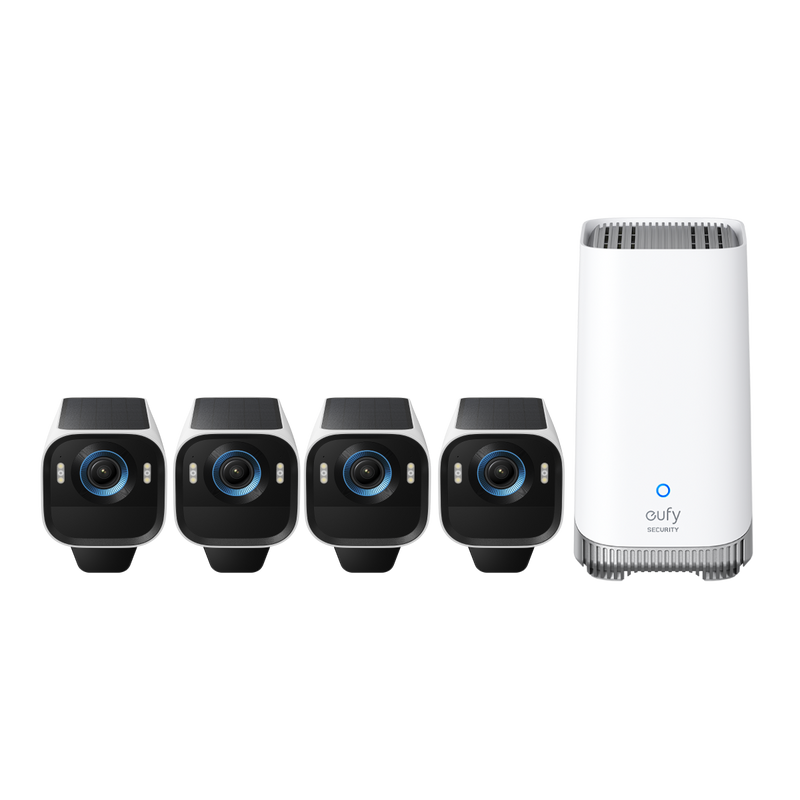
- Resolution4K (3840×2160)
- Field of view135°
- PowerRechargeable battery + detachable solar panel
- StorageHomeBase S380: 16 GB built in, expandable up to 16 TB
- Smart homeApple Home, Alexa, Google
The eufyCam S3 Pro is the most complete no-fee camera system we found. Video is recorded to the included HomeBase S380, which has 16 GB of storage built in and expands up to 16 TB, so you can keep weeks of footage without paying for the cloud.
Each camera records 4K with eufy’s MaxColor Vision for full-color night footage without a spotlight, and AI recognizes humans, vehicles and pets. It has a 100 dB siren, a detachable solar panel and works with Apple Home, Alexa and Google (Apple Home video is 1080p). The 4-camera kit was $799.99 at eufy.
What we like
- True 4K video with strong color night vision
- Advanced AI features included at no cost
- Huge local storage capacity through HomeBase 3
- Built-in solar charging means little or no battery charging
Watch out for
- High upfront cost compared with single cameras
- Needs the HomeBase 3 hub and a steady Wi-Fi signal
- Eufy had well-publicized security lapses in 2022 (see our privacy note below)
Best for: Homeowners who want a complete multi-camera system and are happy to pay more upfront to avoid fees for years.
Skip it if: You only need one camera, or your cameras will sit far from your Wi-Fi router.
Check price on Amazon Price range: $799.99
Reolink Argus 4 Pro

- Resolution4K, 180° dual-lens view
- Field of view180°
- PowerBattery + Reolink solar panel
- StoragemicroSD (up to 512 GB) or Reolink Home Hub
- Smart homeReolink app
Two lenses give the Argus 4 Pro a 180° blind-spot-free view in 4K, so a single camera can cover an entire yard or driveway that would normally need two. It records to a microSD card (up to 512 GB) or a Reolink Home Hub, with no subscription fees.
It connects over dual-band Wi-Fi 6, supports Reolink’s solar panel, and its ColorX vision shows color video day and night. Smart detection tells people, vehicles and animals apart. It was $214.99 at Reolink when we checked.
What we like
- One camera covers a very wide area
- Records locally with no subscription required
- Dual-band Wi-Fi 6 for a more reliable connection
- Solar panel keeps it charged
Watch out for
- No Apple HomeKit or Matter support
- Vertical view is narrow, so mounting height matters
- Pricier than basic single cameras
Best for: Covering a wide backyard, driveway or side of the house with a single wire-free camera.
Skip it if: You use Apple Home, or you need to see a tall area like a staircase.
Check price on Amazon Price range: $214.99
Reolink RLK8-800B4 4K PoE System

- Resolution4K (3840×2160), 4 cameras
- Field of view87° per camera
- PowerWired PoE (power over one Ethernet cable)
- Storage8-channel NVR with 2TB drive, up to 16TB
- Weather ratingIP67
If you want every second recorded, not just motion clips, a wired system is the most reliable choice. This kit pairs four 4K (8MP) PoE cameras with an RLN8-410 NVR that comes with a 2 TB hard drive and supports up to 16 TB.
Each camera gets power and data through a single Ethernet cable, so there are no batteries to charge and no Wi-Fi dropouts. Person, vehicle and animal detection are free with no monthly subscription. The cameras are IP67 rated with an 87° view and 100 ft night vision, and Reolink backs the kit with a 2-year limited warranty. It was $699.99 at Reolink.
What we like
- Continuous 24/7 recording to a local hard drive
- No batteries and no Wi-Fi to fail
- Free person, vehicle and animal detection
- Room to add more cameras later (up to 8 wired)
Watch out for
- You must run Ethernet cables to each camera
- Narrower view per camera than wire-free models
- Bulkier setup that needs a spot for the recorder
Best for: Homeowners who want professional-style, always-on recording and do not mind a wired installation.
Skip it if: You rent, or you cannot run cables through walls or eaves.
Check price on Amazon Price range: $699.99
eufy SoloCam S340

- Resolution3K wide lens + 2K telephoto lens
- Zoom8x hybrid
- Movement344° pan with tilt
- PowerBattery + included solar panel
- Storage8GB built in; works with HomeBase 3
The SoloCam S340 pairs a 3K wide lens with a 2K telephoto lens and hybrid 8× zoom, and it pans 344° and tilts. That means one camera can watch a large area and still zoom in on details.
It stores video on 8 GB of built-in memory, with optional expansion through eufy HomeBase S380, and the removable solar panel keeps the battery topped up. Human and vehicle detection run on the camera itself, with no monthly fee. It was $219.99 at eufy.
What we like
- Two lenses: wide view plus close-up zoom
- Pans 360° to follow movement
- No microSD card or hub required to start
- Solar panel included
Watch out for
- 8GB of built-in storage fills up fast without HomeBase
- Eufy does not publish an official IP weather rating for it
- Short solar panel cable
Best for: A single camera watching a big area, like a driveway with a gate or a large front yard.
Skip it if: You want months of footage without buying a hub.
Check price on Amazon Price range: $219.99
eufy Video Doorbell E340

- CamerasDual: 2K top + downward package camera
- PowerRechargeable battery or wired
- Storage8GB built in; expandable with HomeBase
- DetectionDual-camera package view, no subscription
- Smart homeAlexa, Google Assistant
Most popular video doorbells need a subscription just to save recordings. The E340 records to its own 8 GB of storage for free. Its second camera points down at your doorstep, so you can see packages left right below the door.
It records 2K with color night vision up to 16 feet, and it can run on its rechargeable battery or be wired to your existing doorbell. It works with Alexa and Google and uses 2.4 GHz Wi-Fi. It was $169.99 at eufy.
What we like
- No subscription needed to save recordings
- Second camera watches packages on the doorstep
- Works on battery or existing doorbell wiring
- Clear 2K video
Watch out for
- No microSD slot; more storage requires a HomeBase
- No Apple HomeKit support
- Wireless chime is sold separately if you do not wire it
Best for: Anyone tired of paying monthly just to see who rang the bell, especially if packages get stolen.
Skip it if: You want your doorbell to live inside Apple Home.
Check price on Amazon Price range: $169.99
TP-Link Tapo C120

- Resolution2K
- Night visionColor night vision with built-in spotlights
- PowerPlug-in, 9.8 ft cord
- StoragemicroSD (sold separately), optional Tapo Care
- Weather ratingIP66 (indoor or outdoor)
The Tapo C120 proves that a no-fee camera does not have to be expensive. It records 2K video to a microSD card (sold separately), and its AI detection identifies people, vehicles and pets.
It is rated IP66, so it works on a porch as well as a living room shelf, and built-in spotlights give color night vision. Tapo Care cloud storage is optional.
What we like
- Very low price for 2K video
- Large microSD support, up to 512GB
- Free person, pet and vehicle detection
- Weatherproof for indoor or outdoor use
Watch out for
- Needs a power outlet nearby
- microSD card sold separately
- Narrower view than premium outdoor cameras
Best for: Budget buyers, renters and anyone who wants a camera for inside the home, a porch or a garage.
Skip it if: There is no power outlet where you want to mount it.
Check price on Amazon Price range: See retailers
Side-by-side comparison
| eufyCam S3 Pro 4-Cam Kit (with HomeBase 3) | Reolink Argus 4 Pro | Reolink RLK8-800B4 4K PoE System | eufy SoloCam S340 | eufy Video Doorbell E340 | TP-Link Tapo C120 | |
|---|---|---|---|---|---|---|
| Best for | Best overall | Best wide view | Best for 24/7 recording | Best pan & zoom | Best video doorbell | Best budget pick |
| Power | Battery + solar | Battery + solar | Wired PoE | Battery + solar | Battery or wired | Plug-in |
| Local storage | HomeBase 3 (16GB–16TB) | microSD / Home Hub | NVR 2TB (up to 16TB) | 8GB built in | 8GB built in | microSD up to 512GB |
| Resolution | 4K | 4K, 180° | 4K | 3K + 2K | 2K | 2K |
| Free AI detection | Human, vehicle, pet | Person, vehicle, animal | Person, vehicle, animal | Human, vehicle | Package view | Person, vehicle, pet |
| Apple HomeKit | Yes | No | No | No | No | No |
| Price | $799.99 | $214.99 | $699.99 | $219.99 | $169.99 | See retailers |
| Our score | 9.2 | 8.9 | 8.8 | 8.7 | 8.6 | 8.5 |
How to choose a no-subscription security camera
1. Pick where your video will be saved
This is the most important choice, because it decides how much footage you keep and how safe it is.
- microSD card in the camera: the cheapest option and easy to set up. The downside is that a thief who takes the camera also takes the card.
- Built-in memory: no card to buy, but usually small (around 8GB), so older clips are overwritten sooner.
- Home hub or base station: stores video from several cameras on one device hidden inside your home. Often expandable with a hard drive.
- NVR (network video recorder): the choice for wired systems and 24/7 recording, with terabytes of space.
2. Check what is free and what is not
“No subscription required” does not always mean every feature is free. Before you buy, check whether person detection, package alerts and video history work without a plan. All six cameras on our list include recording, playback and smart detection at no monthly cost.
3. Choose your power type
- Battery with solar: easiest to install anywhere, with no wires. A small solar panel keeps it charged in most climates.
- Plug-in: never needs charging, but must be near an outlet.
- PoE (power over Ethernet): one cable carries power and data. The most reliable choice for 24/7 recording, but it requires running cables.
4. Match resolution and field of view to the job
2K is enough for most porches and rooms. 4K helps when you need to zoom in on faces or license plates from further away. A wide field of view (135° to 180°) covers more ground with fewer cameras, while a pan-and-tilt camera can follow movement across a large yard.
5. Protect your privacy
Local storage keeps your video at home, but security still matters. Turn on two-factor authentication in the camera app, use a strong unique password, keep firmware updated and put your cameras on a separate Wi-Fi network if your router supports it. Also avoid pointing cameras at a neighbor’s windows, and check your local laws before recording audio outdoors.
Popular brands that charge a monthly fee
Some of the best-known camera brands work very differently. Before buying, know what you will pay after the box is opened:
- Ring: live view and motion alerts are free, but saving and playing back recordings requires a Ring subscription.
- SimpliSafe: cameras stream live for free, but recording requires a paid plan.
- Wyze: cameras are inexpensive and many support microSD recording, but some smart features, such as person detection, need a paid plan.
None of these are bad products, but if avoiding a monthly bill is your top priority, the cameras above are a better fit.
Frequently asked questions
Can a security camera really work with no monthly fee?
Yes. Cameras that record to a microSD card, built-in memory, a hub or a network video recorder (NVR) keep your footage at home, so there is nothing to pay for. You still get live view and alerts in a free app. A subscription only adds optional extras such as cloud backup.
What happens to local recordings if a burglar steals the camera?
If the footage is stored on a microSD card inside the camera, a thief can take it with the camera. That is why systems that save video to a separate hub or recorder hidden inside the home, like eufy HomeBase 3 or a Reolink NVR, are safer. Placing cameras high up also makes them harder to grab.
Is local storage more private than cloud storage?
Generally yes, because your video stays on a device in your home instead of on a company server. It is not a guarantee, though. Keep the app and camera firmware updated, use a strong unique password, and turn on two-factor authentication.
How much storage do I need?
For motion-only clips, a 128GB to 256GB microSD card is plenty for one camera for weeks. For continuous 24/7 recording from several 4K cameras, you need a hard drive measured in terabytes, which is why wired NVR systems include one.
Do these cameras work without Wi-Fi?
Wire-free cameras need Wi-Fi for live view and phone alerts, although some keep recording locally if the connection drops. Wired PoE systems record to the NVR even when the internet is down; you just cannot watch remotely until it comes back.
The bottom line
For most homes, the eufyCam S3 Pro is the best no-fee camera system thanks to its 4K video, free AI features and massive local storage. If you want to cover a wide area with one camera, choose the Reolink Argus 4 Pro. For round-the-clock recording, a wired Reolink PoE system is hard to beat, and on a tight budget the Tapo C120 delivers a lot for very little.
Looking for more ways to protect your home? Browse all our Safe Home guides, or ask us a question.